PIOS Schematic
Jesse Diehl

Creative systems · Indochino · 2026

PIOS is the AI creative system I built for Indochino’s in-house brand team. Here’s how it works.

A brief goes in. On-brand campaign imagery, emails, paid ads and print come out, checked against the same rules every time. Behind it sit a 2,600-page knowledge base, 420 one-fact memory files Claude loads every session, 40 working procedures and 20 connections into the apps the team already uses: Figma, Photoshop, InDesign, Higgsfield and the send platform.

  1. 01It knows the brand

    Brand rules, the design system and typography, plus every product, model and location, and the decisions already made. Every job starts from it, so nobody re-explains the brand.

  2. 02Skills do the work

    Skills for email, paid ads, image generation, copy, print and retail, each built for INDOCHINO. One brief in, finished work out, inside Figma, Photoshop and InDesign.

  3. 03It gets smarter with every job

    Each correction becomes a new rule, so the same mistake doesn’t come back. Every piece is checked before it ships, and nothing publishes or spends money without a person’s yes.

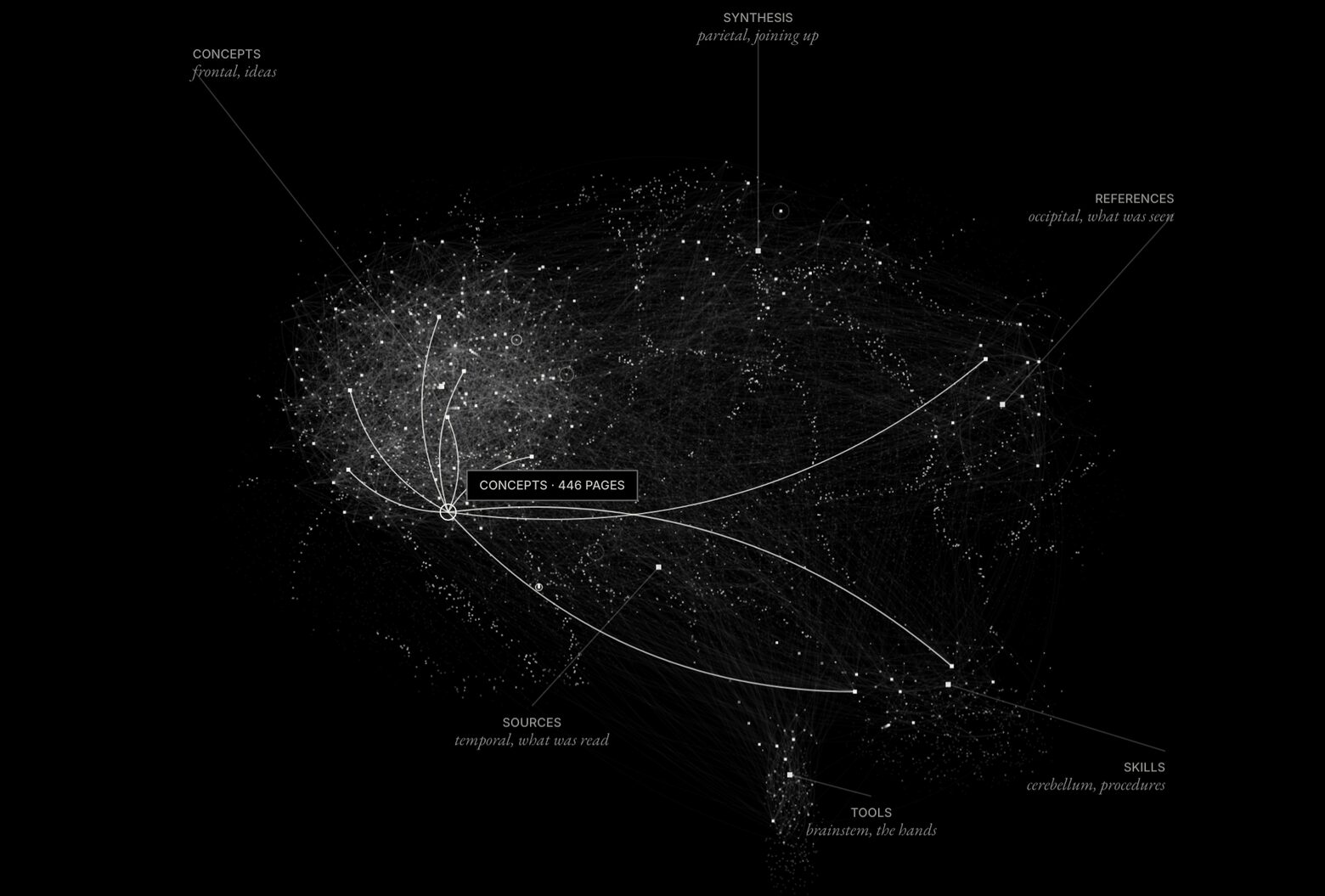
  1. The knowledge base drawn as a brain: dense clusters of white points joined by fine lines, with one folder highlighted and its page count shown.

    01The vault as a brain. Each lobe is a folder of the knowledge base, each point a page, each line a real link between two pages.

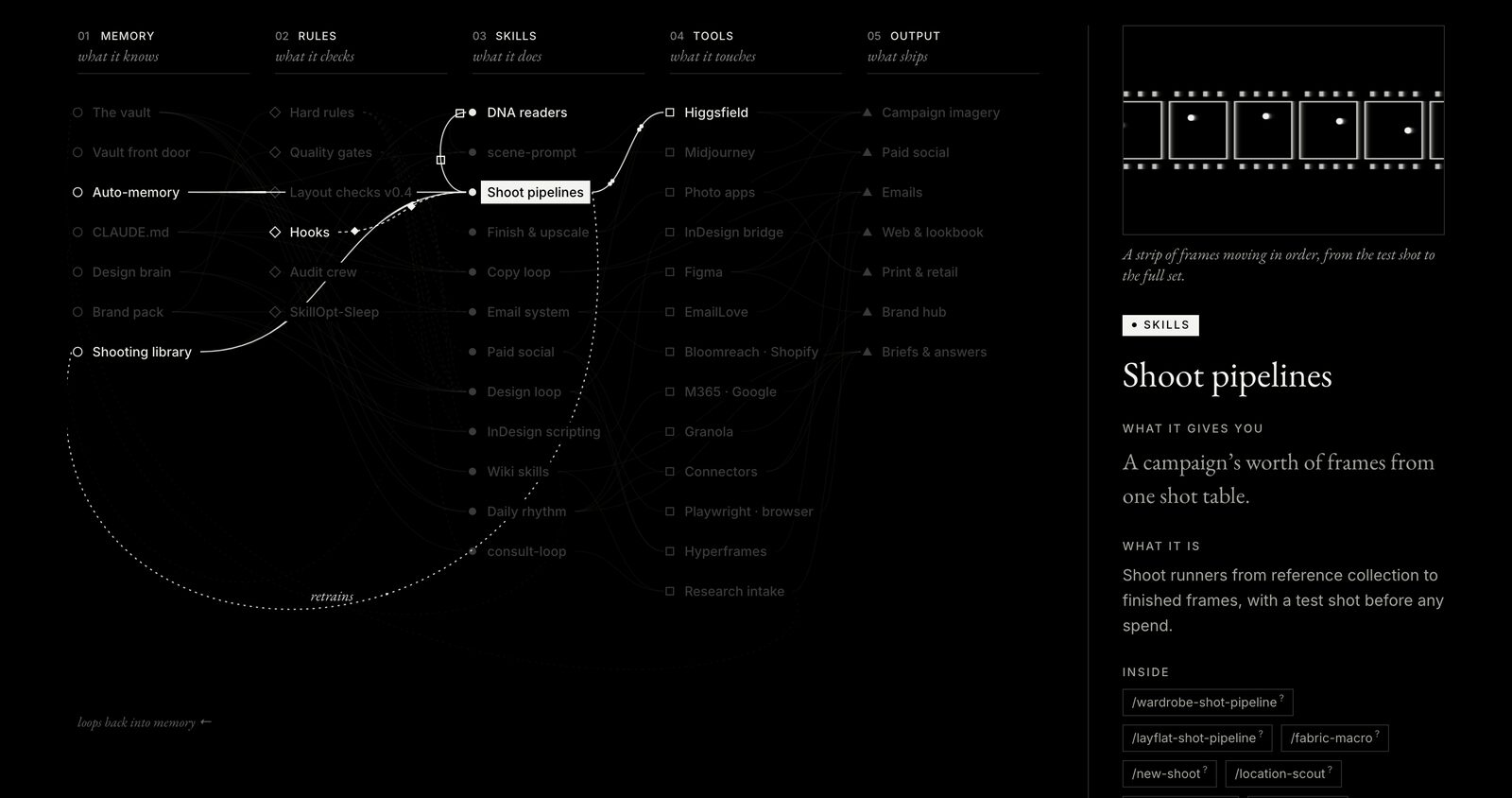
  2. The parts map with Shoot pipelines selected: its links to Higgsfield, Hooks and the shooting library light up, and a side panel explains what it does.

    02Pick any part and its connections light up. The panel says what the part does for the work, what feeds it and what it feeds.

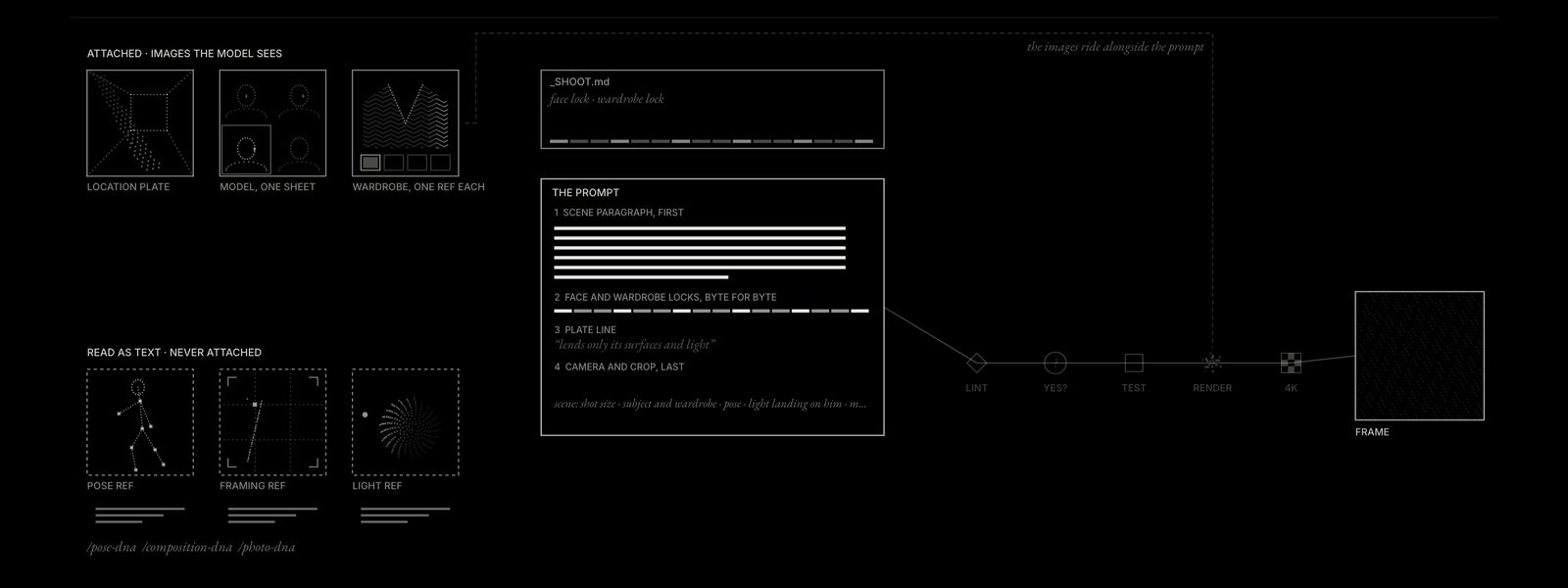
  3. A diagram of an image prompt being assembled: attached images on one side, references read as text on the other, then lint, a yes, a test shot, the render and a 4K frame.

    03How a campaign image is made. Images the model must match are attached, references are read into words, and nothing renders before a yes.

How to read itThe map below is the working schematic, not a picture of it. Hover the brain to see the vault’s folders. On the map, hover any part to see what it does and what it connects to, or press A to E to follow one job from brief to delivery.

PIOS
System map · Jesse Diehl · Indochino creative · 2 Nov 2026

The system behind the work, drawn as one map.

Five layers of one system, from what it knows to what it ships.

Fig. 1 · The as a brain · 870 pages, 2,590 real links · each lobe is a folderHover or tap to see a folder

Sheet 01. How the parts connect

○knows◇checks●does□touches▲ships
informsconstrainsdrivesproduceshands offloops back

Five columns, left to right: what the system knows, the rules it checks, the that do the work, the tools they operate (, , ) and what ships. Hover a part to see what it does and what it connects to, or press A to E to follow one job through the system.

Index of all 45 parts

Sheet 02. How a campaign image is made

Images the model must match are attached. Everything else is read into words first by the , so a reference guides the pose without dragging in someone else’s face or suit.

One , , runs the whole shoot. It asks for references one at a time and stops for an explicit yes before it spends .

  1. 01The location

    The location photo. It’s attached, and it lends only its surfaces and light. Its framing is never copied.

  2. 02Model and wardrobe

    Each model rides as one reference image (ref), his four-view headshot sheet, and it carries only the face. Each wardrobe piece rides as its own ref: the suit as its shoulder cutout, then the shirt, tie, square and shoes. Colour comes from real product photography, never an AI composite or a flat swatch.

    ·
  3. 03Read the references

    Pose, framing and light refs are read into text. They’re never attached, so they can’t pull another person or another suit into the frame.

    · ·
  4. 04The

    The shoot’s holds the face and wardrobe descriptions. They’re pasted byte for byte into every prompt, so nothing drifts between frames.

    _SHOOT.md
  5. 05Scene paragraph first

    One paragraph pictures the whole photograph: shot size, subject and wardrobe, pose, where the light lands on him, mood. Then the face lock, the wardrobe lock, the plate line, and camera and crop last.

  6. 06

    A checks the prompt against the method before anything is sent.

    image-prompt-lint
  7. 07A yes, then one test shot

    Nothing fires until you give an explicit yes, because every spends credits. Then one test frame, before the full set.

    explicit yes
  8. 08Render, fired by the pipeline

    renders the shot table, with the attached images riding alongside the prompt.

  9. 09Finish

    Checked against the image rubric, then upscaled to true 4K.

    · rubric-image

Sheet 03. The design brain, and InDesign by conversation

The design brain

Four books on layout, each reduced to the one idea it gives you. Every rule becomes a measurable check with its own code. Hover an idea to open it.

Fig. 2 · Four ideas, one checklist103 + 42 + 41 + 72 = 258
  1. BR · 103 checksRhythm and measure

    How long a line runs, how far apart lines sit, how sizes step up. Type set for the person reading it.

    BR-2.1.2a · a line outside 45 to 75 charactersThe Elements of Typographic Style
  2. MB · 42 checksThe grid as order

    Columns, modules and margins that decide where anything may sit, so a page reads as one system.

    MB-p07b · more than four image sizes, no reason givenGrid Systems in Graphic Design
  3. EL · 41 checksGrouping and space

    Position and white space tell the reader what belongs together and what comes first. Empty space has to do a job.

    EL-p13a · an empty band doing no workGrid Systems: Principles of Organizing Type
  4. SM · 72 checksBreaking the grid

    When a layout should leave the grid, and how to make the break read as a decision instead of an accident.

    SM-p70 · an image edge landing mid-columnMaking and Breaking the Grid

Ask for a critique and it comes back with row numbers and measured values: BR-2.1.2a · 89 cpl · miss.

InDesign, driven by conversation

You never touch the script. Ask Claude for a change in plain words with the document open. Claude writes the script, InDesign runs it, and the numbers come back for Claude to read to you.

Fig. 3 · You, Claude and InDesign73 scripts on file

What gets checked comes from the design brain. Here it’s rule BR-8.5.1a, judged on the brochure’s real margins. The indesign-scripting skill, probed against a live InDesign 2026, is the reference behind every script.

What you can ask for · 8
  • Restyle a document to the brandbrand-restyle.jsx
  • Check fonts, links and marginscheck-fonts · fix-links · check-margins
  • Respace or reflow a pagespace-page2 · reflow-page1
  • Place or fix iconsplace-icons · fix-icons
  • Merge duplicate swatchesmerge-swatches
  • Resize pagesresize-pages
  • Preflight and export print-ready PDFspreflight-print · export-printready
  • Package files and round-trip IDMLpackage-both · idml-roundtrip
2,600
vault pages
420
memories
40
personal skills
20
MCP servers
9
connectors
8
plugins